

PCmover Professional 12.0
It enables you to transfer everything you want to your new PC
Program info
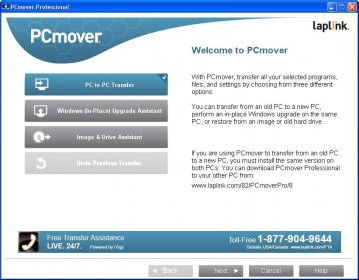
PCmover Professional is a system migration and backup and restore tool for Windows. It can copy your programs, settings and files from an old computer to your new one. It also comes with an upgrade assistant designed to help you upgrade to the latest version of Windows.
PCmover does everything from a wizard, which has lots of help and tips and makes things very easy for you. There are three main modes. The first one allows you to transfer your programs, files, and settings from an old computer to a new one. You have to install the application in both computers and tell PCmover which is which. Then, you simply connect both computers via a network, a Laplink Ethernet Cable, a file storage device, or even a USB Cable and the transfer is started.
The second mode is the Windows 7 upgrade assistant, which does pretty much the same thing than the first mode. The third mode creates an image file of your disc, from which you can later restore data to your PC.
The trial version of PCmover only allows you to move files of one type (for example, word files). Thus, you can't really try whether the tool will work for you. There is a disclaimer that warns you about a few things. The most important one is that applications that are installed as services will have to be reinstalled manually on your new computer. PCmover does not transfer hardware drivers.
Pros
- It creates images of your discs or it can help you upgrade your system by copying settings and applications
Cons
- It won't restore application settings
- It won't copy drivers nor system services
Details
Extensions

No information available
The data will be available later.Awards

Recent downloads


Latest updates
-
 EasyBilling Invoicing Software 10.0
-
Ashampoo Photo Commander Pro 27 27.0
-
Screen2ipcam 2.0
-
Express Scribe Free Transcription Player 15.1
-
dbForge AI Assistant 2026.2
-
dbForge Compare Bundle for MySQL 2026.2
-
dbForge Compare Bundle for Oracle 2026.2
-
dbForge Compare Bundle for SQL Server 2026.2
-
dbForge Edge 2026.2


Comments